The business application development landscape is facing challenges like never before. When customers invest in a project, they expect top software quality, produced in record time.
Key to success in this pressing environment is a combination of a dedicated team, adherence to best practices, premium software development and testing tools and methodology, and impeccable user support. In other words, a development team’s success hinges on:
Acumatica customizations are no different. Emphasizing a systematic Application Development Workflow is essential, and we at Sprinterra have learned that by experience. Successful practices include:
Meeting these standards ensures the creation of reliable, scalable, and maintainable applications promptly, making your clients return to you time and time again.
This article explores The Application Development Workflow, its automation tools, and improvement strategies.
While working on Acumatica at Sprinterra, our repository expanded from a single project to an impressive 160. Every project we’ve undertaken is carefully archived. We pride ourselves on our diligent record-keeping; not a line of source code is deleted. Instead, every project we’ve ever engaged with is archived in the company repository, even long after completion. That’s because some of our customers come back to us regularly. At Sprinterra, we tend to classify these into three categories:
The above projects share a common thread: they are all automated in some form. Configuration settings for scripts and automation utilities are stored in our repository. This setup ensures that any developer on our team can effortlessly clone the repository of any project onto their computer. Even if they encounter that project for the first time, they can establish a working development environment for it in minutes.
That’s a testament to our commitment to efficiency and productivity. Lacking similar automation tools, setting up and updating some of our customers project’s development environment becomes a manual, time-consuming chore. This contrasts with the ease of deploying an automated Acumatica customization project.
For any developer embarking on a new Acumatica ERP customization project, a precise sequence of steps is essential to ensure the work’s efficiency and success.
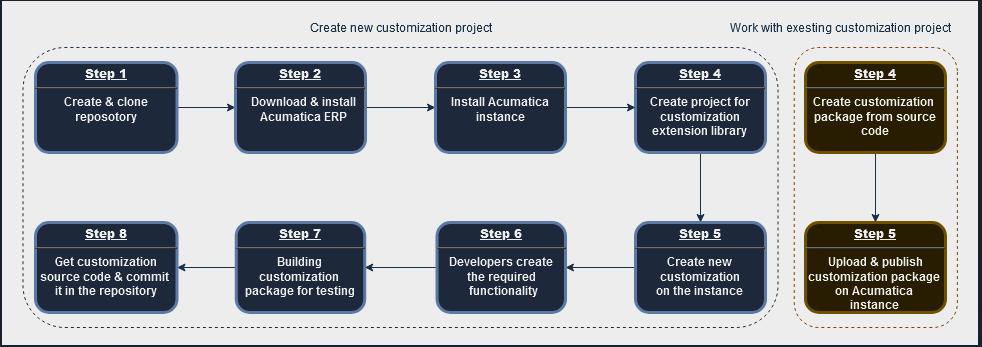
Throughout the project, there are periodic tasks, including:
Once customization is complete, a developer needs to:
If the developers are joining an ongoing project, they should replace steps 4 and 5 (above) with:
Given the multitude of repetitive tasks in customization, the value of automation becomes clear. So, what “out-of-the-box” tools does Acumatica recommend or provide? Here’s a step-by-step overview of these utilities:
PowerShell Integration:
Step 1: PowerShell + git Command Line Interface (CLI)
Step 2: msiexec /a drive:\filepath\to\MSI\file /qb TARGETDIR=drive:\filepath\to\target\folder
Step 3: ac.exe -cm:”NewInstance” -s:”SM” -d:”InstanceDB” -c:”ci=1;” -c:”ci=2;cp=1;ct=Demo;cv=True;cn=Company;” -i:”Instance” -h:”C:\Acumatica\Instance” -w:”Default Web Site“ -v:”Instance” -po:”Classic .NET AppPool” -a:”AnonymousUser”
Step 4: At present, there’s no means of automation.
Step 5: This step cannot be automated.
Step 6: Automation isn’t required.
Step 7: PX.CommandLine.exe /website “path_to_Acumatica_website”/method BuildProject
/in “path_to_customization_source_control_folder”
/include “path\to\additional\file1.ext” “relative\package\path\to\file2.ext”
/out “full_name_of_customization_file.zip”
Step 8: Currently, there’s no means of automation for this step.
From the provided details, it’s evident that the developer has Windows Installer and Acumatica tools at their fingertips. But these provide only partial solutions. They often come with complex parameters, making daily operations clunky. Moreover, the necessity of direct developer involvement, especially in extracting customization source code, hinders complete automation. Additionally, there’s no provision to save configurations for future reuse.
The biggest challenge remains: efficiently accessing the customization source code. Acumatica only enables this via the customization editor menu, a manual process that lacks automation.
Recognizing these challenges, the obvious way forward is a unified utility that includes all necessary functions while eliminating the mentioned drawbacks.
Understanding these challenges, Sprinterra’s Acumatica team, with their rich experience in development automation, identified the need for a holistic tool. Our vision for an ideal Acumatica ERP automation utility includes:
Conclusively, there’s a significant need to improve the customization development workflow for Acumatica ERP. While existing utilities offer some assistance, they fall short of comprehensive developer needs.
Recognizing these gaps, Sprinterra’s Acumatica team proudly presents ACUCustomizationutil – a unique tool designed to streamline and improve customization projects.
Stay tuned for the second part of this article, where we’ll delve deeper into ACUCustomizationUtil’s features and offer practical insights.
Get the latest insights on exponential technologies delivered straight to you
We use cookies to improve your experience on our site. By using our site, you consent to cookies.
Manage your cookie preferences below:
Essential cookies enable basic functions and are necessary for the proper function of the website.
Google reCAPTCHA helps protect websites from spam and abuse by verifying user interactions through challenges.
Google Tag Manager simplifies the management of marketing tags on your website without code changes.
Statistics cookies collect information anonymously. This information helps us understand how visitors use our website.
Google Analytics is a powerful tool that tracks and analyzes website traffic for informed marketing decisions.
Service URL: policies.google.com (opens in a new window)
Clarity is a web analytics service that tracks and reports website traffic.
Service URL: clarity.microsoft.com (opens in a new window)
Marketing cookies are used to follow visitors to websites. The intention is to show ads that are relevant and engaging to the individual user.
LinkedIn Insight is a web analytics service that tracks and reports website traffic.
Service URL: www.linkedin.com (opens in a new window)
You can find more information in our Cookie Policy and Privacy Policy.